Modern L-Shaped Glass Computer Desk: Steel Frame + Tray
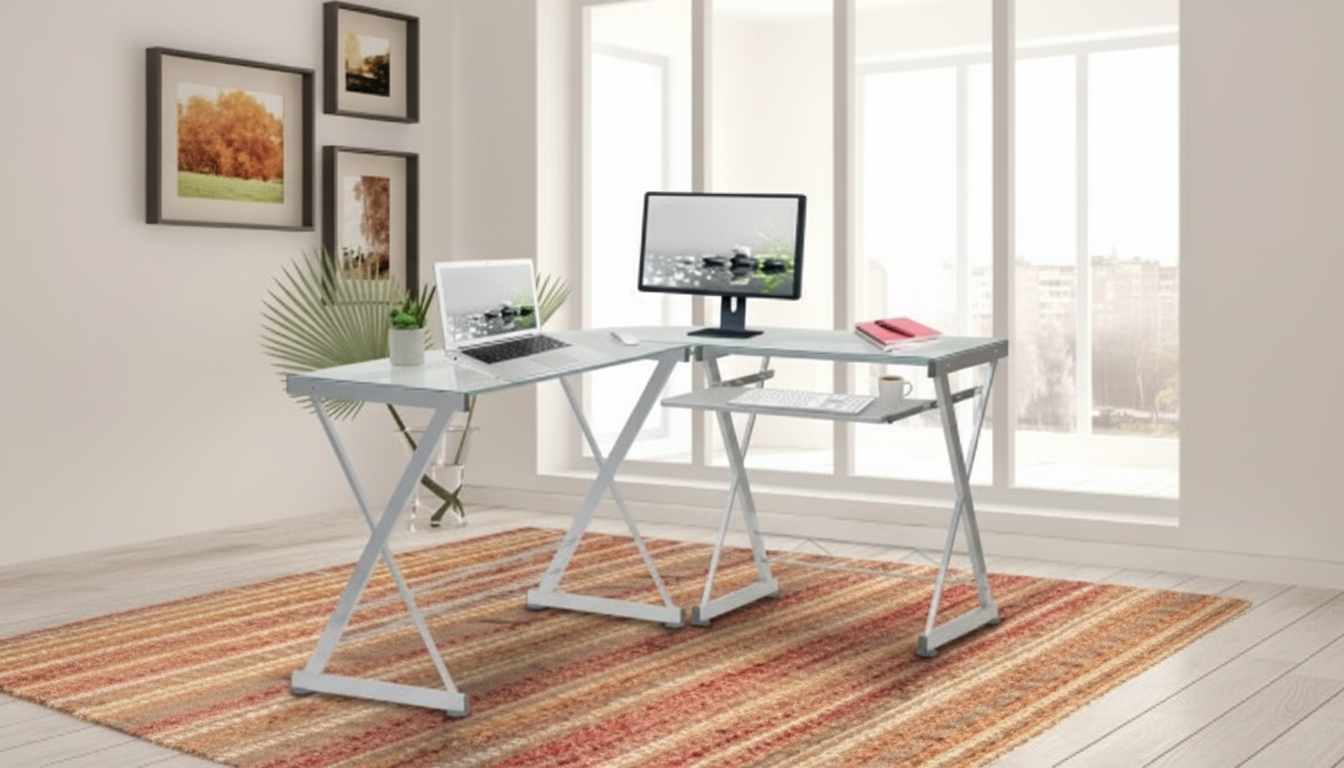
Modern L-Shaped Tempered Glass Computer Desk with Steel Frame and Pull-Out Keyboard Tray
A modern L-shaped desk can turn an unused corner into a clean, efficient command center for work, study, and gaming. With a tempered glass top, a steel frame, and a pull-out keyboard tray, this style balances a light visual footprint with everyday practicality—especially for multi-monitor setups, shared home offices, or anyone who wants clear separation between “computer zone” and “writing zone.”
What Makes an L-Shaped Glass-and-Steel Desk Different
An L-shaped desk is built for task separation without doubling your furniture footprint. Instead of squeezing everything onto one rectangle, the “return” creates a second surface that’s immediately accessible from the same chair.
- Uses a corner-friendly footprint to create two distinct work surfaces without needing two separate tables
- Tempered glass keeps the desktop looking open and bright, helping smaller rooms feel less crowded
- Steel framing adds rigidity and helps reduce side-to-side wobble compared with lighter materials
- The L layout naturally supports task zoning: computing on one side, paperwork or peripherals on the other
Design and Layout: Making the Most of the L Shape
Corner placement is the secret advantage: it preserves walkways and makes the room feel less “furnished-in.” Many people find an L shape easier to keep organized, because there’s a natural “main wing” for the monitor and mouse and a “support wing” for everything else.
- Corner placement frees up walkways and leaves more open floor area in compact rooms
- Works well for dual-monitor arrangements, a monitor + laptop setup, or a PC tower plus peripherals
- Creates a natural “primary” side (monitor/mouse) and “secondary” side (printer, notebooks, chargers, décor)
- Before buying, measure both wall runs and confirm chair clearance and drawer/door swing nearby
Quick Fit Checklist (Measure Before Setup)
| What to measure | Why it matters | Practical tip |
|---|---|---|
| Corner wall lengths | Ensures both wings of the desk fit without blocking outlets or trim | Mark the footprint on the floor with painter’s tape |
| Chair clearance behind desk | Prevents cramped seating and allows comfortable rolling/standing | Aim for a clear path for the chair to slide back |
| Monitor depth + stand footprint | Keeps screens safely away from edges and improves viewing distance | Plan for monitor arms if depth is tight |
| Keyboard tray travel space | Avoids tray bumping into chair arms or knees | Test sitting posture with elbows near 90° |
| Power outlet access | Reduces cable strain and clutter | Position a surge protector under the desk if possible |
Materials and Build: Tempered Glass + Steel Frame
Tempered glass is widely used in furniture because it’s engineered to be stronger than standard glass and, when broken, it typically crumbles into smaller pieces rather than jagged shards. For a deeper overview, see Encyclopaedia Britannica’s summary of tempered glass.
- Tempered glass is designed to be more resistant to breakage than standard glass and is widely used in furniture and fixtures
- A steel frame supports the desktop and helps the desk hold its shape under daily loads (monitors, speakers, books)
- Glass surfaces are easy to wipe clean and are less likely to absorb stains compared with porous tops
- For stability, ensure all fasteners are tightened evenly and the desk sits level on the floor
For day-to-day confidence, the build is as important as the surface. A steel frame matters most at the corners and along the long spans where bending can show up over time. If your floor is slightly uneven, leveling feet or protective pads can make a noticeable difference in wobble and noise.
Pull-Out Keyboard Tray: Comfort and Space Benefits
A pull-out keyboard tray can be the difference between a desk that looks spacious and one that feels cramped. Sliding the keyboard and mouse off the main surface gives the top back to writing, sketching, or simply keeping a tidy look between meetings.
For ergonomics, the goal is neutral wrists and relaxed shoulders. OSHA’s workstation guidance offers practical pointers on arranging screens and input devices for comfort over longer sessions: OSHA Computer Workstations eTool.
Daily Use Scenarios: Work, Study, and Gaming
Cable Management and Clean Desk Setup
Care and Maintenance for a Glass Desktop
Key Details to Review Before Ordering
Product Options
- Modern L-Shaped Tempered Glass Computer Desk with Steel Frame and Pull-Out Keyboard Tray (Corner-ready setup for clean aesthetics, durable support, and space-saving keyboard placement)
- Boost Your AI Prompts for Better Output – Checklist for Creators, Coaches & Entrepreneurs | Digital Download (A compact workflow companion for refining inputs and staying consistent when working on screen)
- Returning to Work After Motherhood: Your Ultimate Guide for Stay-at-Home Moms (A structured guide for planning a return-to-work routine that fits a home office setup)
FAQ
Is a tempered glass desk safe for everyday computer use?
Yes—tempered glass is engineered to be stronger than standard glass and is commonly used in furniture. Avoid sharp impacts on edges, use pads under heavy items, and keep all hardware tightened so the top stays evenly supported.
Does an L-shaped desk work in a small room?
It often works better than a straight desk because it turns a corner into usable workspace and keeps walkways clearer. Measure both wall runs and leave enough chair clearance so you can slide back comfortably without bumping doors or drawers.
How should the keyboard tray be positioned for comfort?
Set the tray so your elbows land near a 90-degree bend with relaxed shoulders and neutral wrists while typing. Confirm your knees and chair arms clear the tray when extended, then adjust monitor height so the top of the screen sits close to eye level.











Leave a comment